See the source here https://github.com/ACarling/Vintage-Story-Mod-Loader
(Not my most shining example of software engineering, but it works, and we use it)
Motivation:
I live far from my family so to keep in touch we sometimes play video games together, one that we keep coming back to is Vintage Story. Its good fun but its in early access and after a while we realised there were some pretty good mods to fill the void while the devs and their healthy development habits chip away on the main game.
This is all well and good but say a shiny new update comes out, and you want to try it out. You will need to:
- Download a new version of vintage story (overwriting the old one)
- Delete all the out of date mods.
This is fine in one direction but if you now want to go back and play on your old modded world it is a massive hassle.
TLDR: mods update at different rates to the base game, if you want to play with a set of mods, and you generally want to lock your save data, and mods to a specific version of the game.
So I wrote a mod launcher.
It allows you to create multiple instances of Vintage story all with their own siloed game data. You can then add mods to these instances without affecting any of the others. Also: it lets you export mods to JSON files so you and your friends/family and synchronise mod packs and versions.
Implementation:
When I do something that I actually just want to use as soon as possible I always kind of go back to the same tech stack, generally JavaScript (typescript now) and HTML just due to how simple it is to get a working UI going.
This needed to be a desktop app, so I also use electron here.
The linchpin for this is that vintage story has launch options for declaring where to read its save data from.
The basic operation goes like this:
- Create a new folder under app data when a pack is instantiated
- install the game to this folder using the specified versions' installer
- Hit the API for mod zip file paths and populate the mod folder (expose this to the user)
- launch the game specifying the packs' data folder
Feature walkthrough:
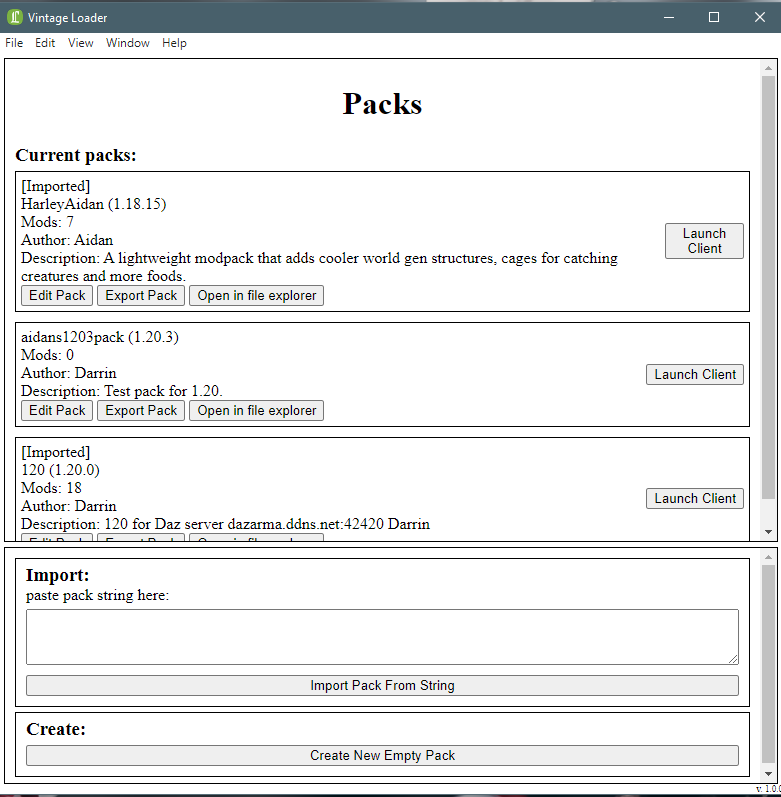
Home page
Allows you to easily see download, import, and create packs as well as launch vintage story using that packs instance
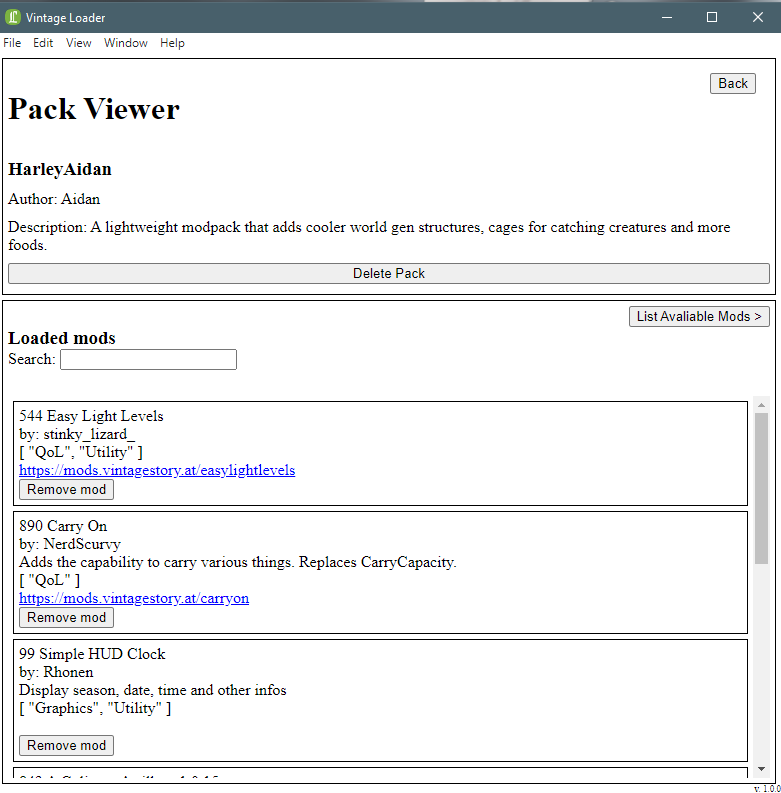
Pack viewer
Check installed mods and their data pulled from the vintage story Mod API, the mod downloading page looks pretty much the same.
Search works on anything in the mods' metadata, mod description, ID, Author, or tags
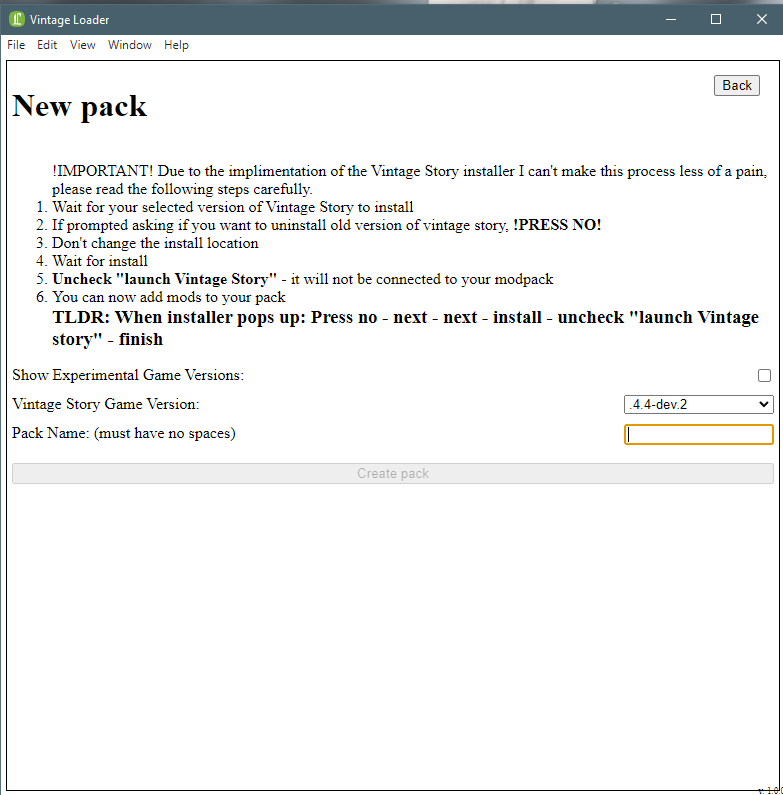
Pack creator
Pretty simple, choose from the list of available versions, put in a name, if the version isn't in the cache it'll download a new installer and run it for you.
Unfortunately there wasn't really any way for me to automate the installation process further and some of the defaults can kinda mess up the pack if you're not careful i.e. the checkbox for "uninstall previous version" which I can't force skip
1 / 3
Take aways:
Firstly this was only really possible because the vintage story Devs keep their data very well-organised and open it for anyone (thanks)
Secondly: This project worked very well initially but is slowly breaking down as the operating system changes and my packages aren't being updated. It still works for me and my family but I've been considering rewriting it in wails if I get a spare moment.
Oversight 1
each pack maintains a metadata file which is prone to going out of sync if you join a server with different mods or if the user fiddles with their file system i.e. adds a mod manually
Take away
When dealing with things you have limited control over (e.g. file system) construct your metadata based on the actual data and only cache for short periods of time (sessions)
Oversight 2
Just cause the open source library works now doesn't mean it always will --- you need to elevate the app to use admin perms in order to actually run the installer on behalf of the user. Windows 11 broke whatever package I was using, and the maintainer stopped working on it
Take away
Sometimes it's better to shop around a bit for a robust looking open source library instead of picking the first one off Google
Electron
- First time using electron, once you get the basics down it feels very much like writing a client+server web app just with IPC instead of http.
- Now that I've discovered wails I'm probably not going to come back to electron anytime soon. - The boilerplate situation and developer experience is just a lot better