When I was mucking around with setting up some VPNs I had an epiphany about network security... I really don't need to be exposing so much of my server's services to the public internet anymore.
My server is basically a bundle of docker containers all behind a reverse proxy, I've got a wildcard DNS entry in Route53 which sends all traffic on a specific subdomain to my proxy which then routes based on further subdomains.
e.g. X.server.domain.com would go to the proxy then to the app "X". When I first set this up I think I was a bit overzealous with exposing everything on it.
I have some thoughts:
- I want some services to only be accessible via a VPN
- I want the reverse proxy to be a single source of truth and work for VPN traffic
- I want everything to be as ephemeral as possible
Now the complicating factor here is that I have 2 VPNs on my server. One that I let family and friends use when they go on holiday overseas (WireGuard), and another I want to use for local access (Tailscale1)
Here's kind of what my (extremely simplified) network topology looks like now: 2
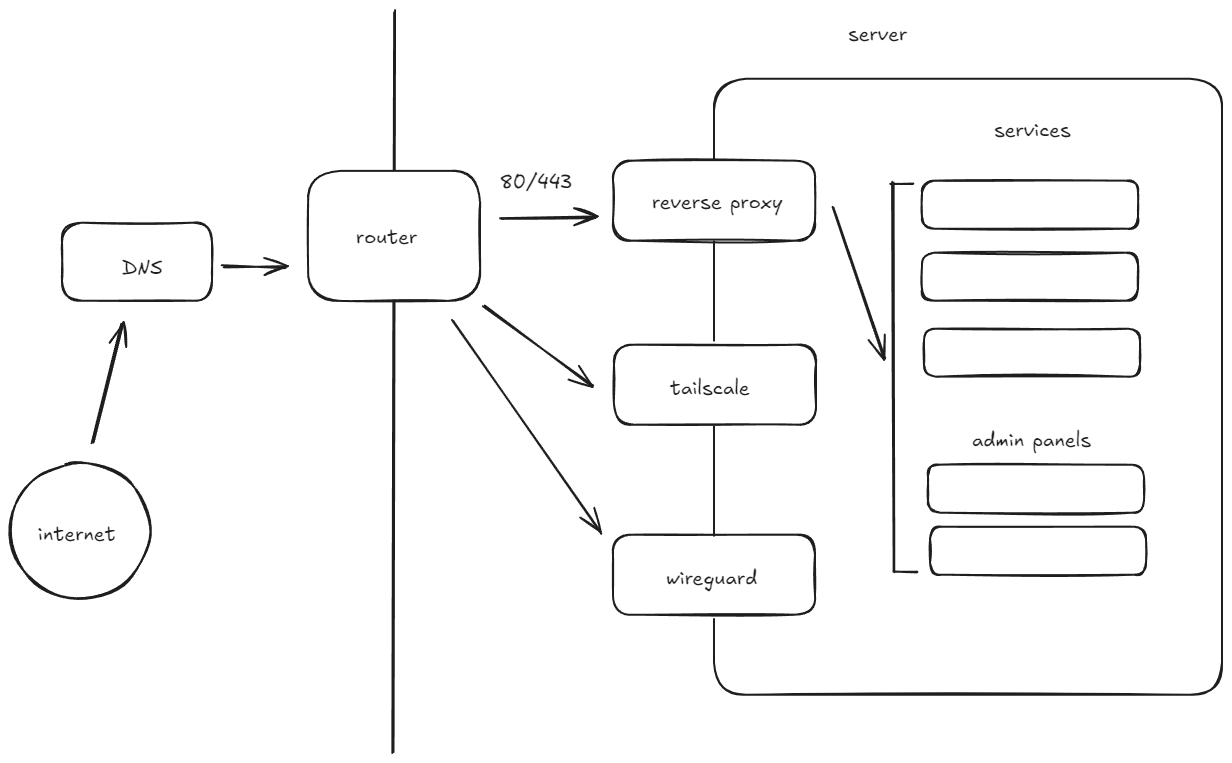
here's what I'd like it to look like:
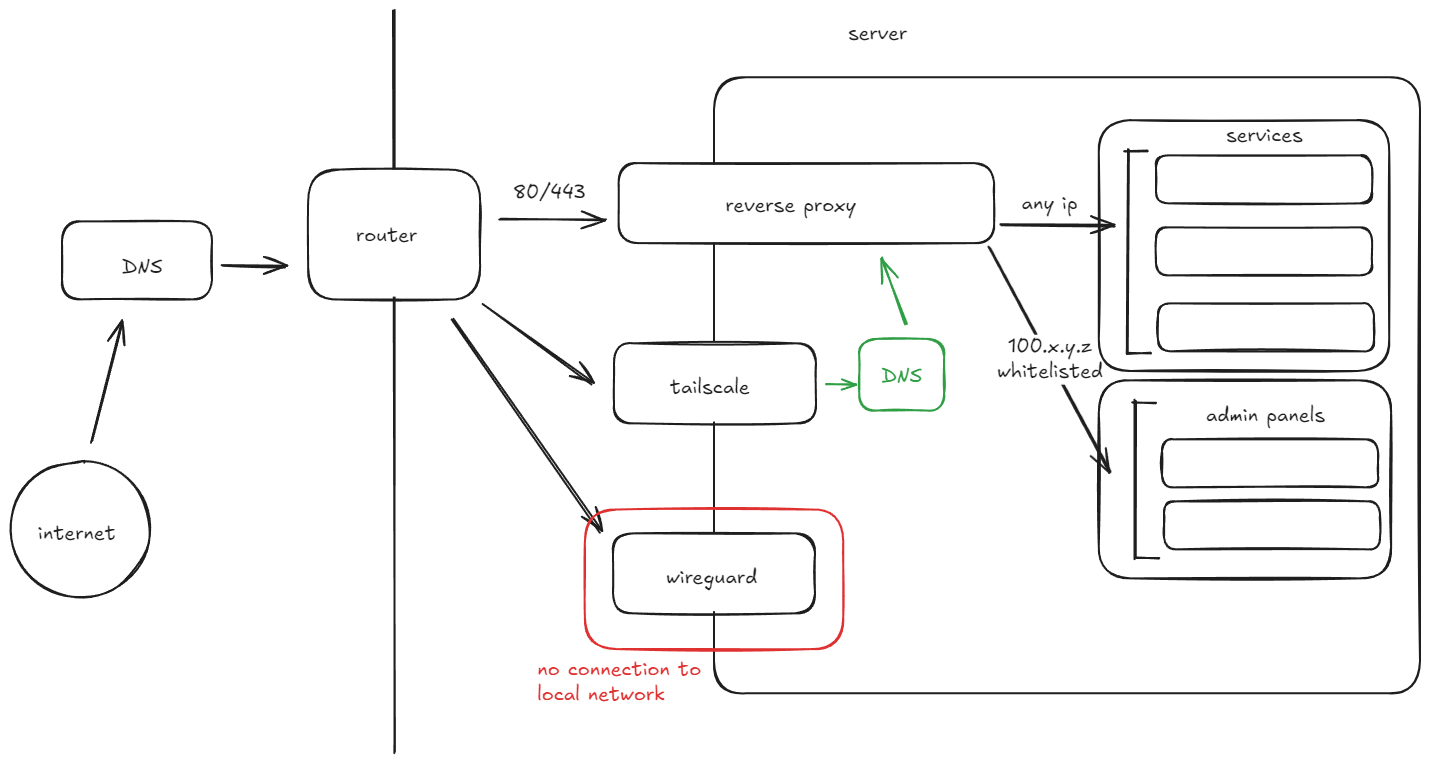
Todo:
- Fix port forwarding: Currently all my services are in containers on a virtual bridge network, I made a minor mistake, these contains all unnecessarily expose ports on the actual machine.
- Split Horizon DNS: I want to route Tailscale traffic addressed to my server directly over the Tailscale Network (Tailnet). I will need a local DNS for this.
- Put Wireguard in a DMZ: I want to ensure the Wireguard VPN is completely blocked out of my local network and works exclusively as a relay.
Fix port forwarding:
First step is to re-create all my containers without container to host port forwarding rules and put them all on an internal bridge network connected to the reverse proxy.
This was also a convenient time to step back, update all my containers to the latest version, and reset duplicate passwords.
Split Horizon DNS:
Simply put: a DNS server takes a hostname (Google.com) looks it up and gives back an IP address.
I have been using the Route53 DNS for ages, and it works perfectly fine for site hosting and AWS stuff. For my server I basically have a wildcard rule which routes all traffic ending with some subdomain to my home IP, my router then forwards all of this traffic to my server which finally passes the request to my reverse proxy which decides which container frontend to serve.
From here on imagine that we own a hostname called server.foo and our external DNS is giving our routers IP for the wildcard rule *.home.server.foo, the router is port forwarding pt 80 and 443 and routing that traffic to our reverse proxy.
Why?
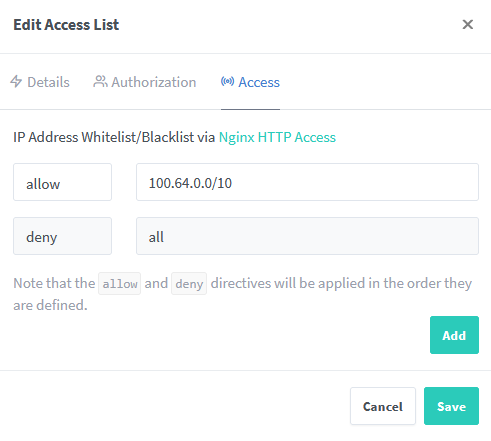
My reverse proxy can do per host IP address whitelisting which is cool, I want to leverage this by whitelisting only Tailscale traffic to my admin consoles.
This plan has a major problem: Route53 knows nothing about my internal network infrastructure (and I don't want it to). When I make a DNS query it'll return my router's external IP which means my request (even if it is between Tailscale devices) will go via the public internet meaning the source address would be the public IP of the device not the Tailscale IP.
Enter split horizon DNS.
Whenever a request on our Tailnet wants to go to a host on another machine sitting inside our Tailnet we tell our device to ask a local DNS server first. This DNS server will either tell us to go direct via our Tailnet or will defer to a regular real world DNS. The thing that makes this "split horizon" is that we only use it to lookup IPs on a certain subdomain: *.home.domain.foo, all other requests still go to the system default DNS.
DNS setup:
I'm using the Technitum DNS server running in a docker container using a host network driver
When I tried to start it initially I got a "port 53 in use" error. Turns out Ubuntu (and probably every other OS) runs a DNS resolver for local caching and such. Ubuntu uses systemd-resolve.
To disable systemd-resolve we just pop open /etc/systemd/resolved.conf, uncomment #DNSStubListener=yes and change it to DNSStubListener=no then run sudo systemctl restart systemd-resolved.
With that done our own DNS will launch we can log into the DNS admin panel at http://localhost:5380 and get configuring.
To be completely honest the main reason I picked the Technitum server is its nice UI but you can do this with anything (Pi-hole is popular too). I found debugging the DNS connections through the terminal a nightmare, looking at some graphs significantly helped me.
I would recommend downloading either of the the "Query Logs" apps. I got the sqlite flavour, this was a significant help with troubleshooting
DNS Config
The first step to configuring our split horizon is spinning up a new zone, this would just be whatever you want to use on the Tailnet to connect with your reverse proxy. In order to avoid SSL cert issues I just set this the same as the external hostname (home.server.foo).
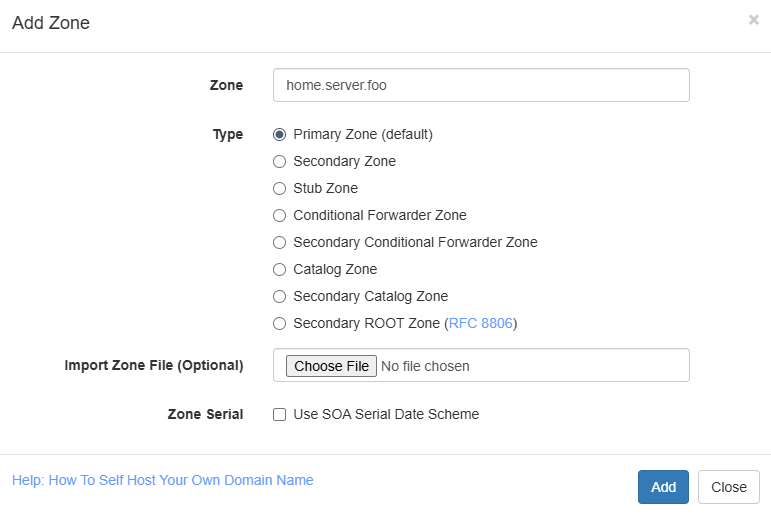
We can then create a wildcard A name record that points to our reverse proxy machine's 100.64.0.0/10 tail scale static IP.
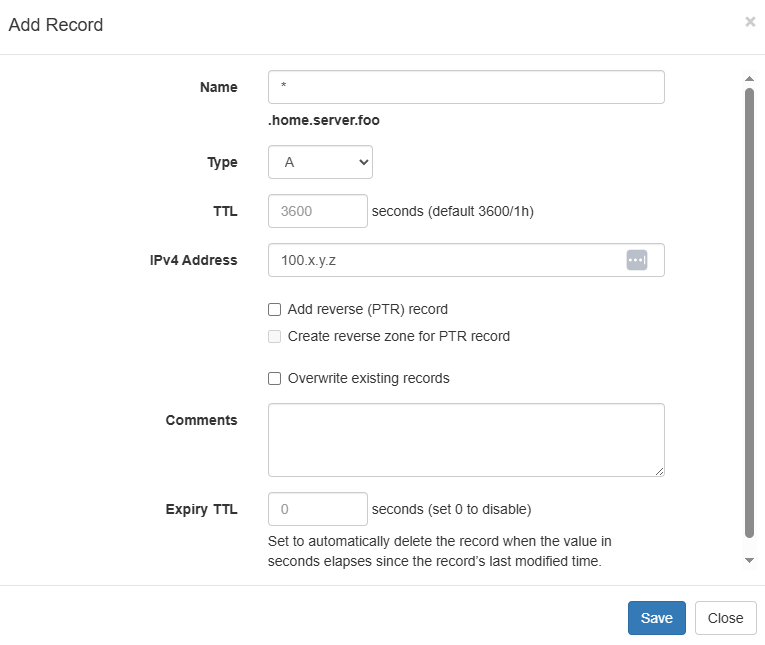
This is actually pretty much It for our DNS config.
Tailscale Config
Tailscale makes this whole process extremely easy
- Log into your Tailscale admin panel
- Navigate to the DNS tab
- Click "Add nameserver"
- Select custom
- Enter the static Tailnet IP of the machine which is running the DNS server
- Activate the "Restrict to domain" switch (This is the split horizon part)
- Input your domain i.e.
home.server.foo
Reverse Proxy IP Whitelisting
I found that local and Tailnet incoming traffic to my reverse proxy was coming in on the docker bridge network's IPV4 Gateway IP address not the Tailscale Static IP....
Apparently the problem stems from the userland-proxy that docker uses, I don't need its capabilities so I can pretty safely (🤞) turn it off.
sh# /etc/docker/daemon.json
{
	"userland-proxy": false
}
Now that that's done, I can just add the whitelist rule to proxy manager
Restricting the Untrusted VPN
I have a VPN which I use while travelling and also let other friends use, I want it to act almost exclusively as a tunnel into the Australian internet, ideally with no access to my LAN devices.
I looked into firewall rules for this but couldn't work it out then realised that WireGuard has an "allowed IPs" section. I plugged the RFC1918 IP ranges into the disallowed IPs spot input of this calculator, and it spat out an extremely ugly string of ranges, if it works it works though i guess?
AllowedIPs = 0.0.0.0/5, 8.0.0.0/7, 11.0.0.0/8, 12.0.0.0/6, 16.0.0.0/4, 32.0.0.0/3, 64.0.0.0/2, 128.0.0.0/3, 160.0.0.0/5, 168.0.0.0/6, 172.0.0.0/12, 172.32.0.0/11, 172.64.0.0/10, 172.128.0.0/9, 173.0.0.0/8, 174.0.0.0/7, 176.0.0.0/4, 192.0.0.0/9, 192.128.0.0/11, 192.160.0.0/13, 192.169.0.0/16, 192.170.0.0/15, 192.172.0.0/14, 192.176.0.0/12, 192.192.0.0/10, 193.0.0.0/8, 194.0.0.0/7, 196.0.0.0/6, 200.0.0.0/5, 208.0.0.0/4, 224.0.0.0/3, ::/0
Turns out this doesn't work... Adding this doesn't update existing clients, also its not authoritative for some reason >:(
Back to the firewall.
Ok turns out this actually a lot easier than I thought:
Firstly I set up a docker network called DMZ on the Ipv4 address range 172.255.0.0/16 I've added the Wireguard container to this docker network and set up the following Iptables rules:
We need to add rules to the DOCKER-USER chain, this is a firewall chain which is processed before all other docker chains for docker networks see docker packet filtering and firewalls
Our DMZ chain needs to do the following:
- Allow outgoing traffic (but block traffic to my router's web interface)
- Reject all other local traffic (RFC1918)
In iptables this looks something like this:
sh:DMZ - [0:0] # Create the DMZ chain

# ------------------------ DOCKER USER CHAIN ------------------------
# If traffic from our docker DMZ network, run the DMZ chain
-A DOCKER-USER -s 172.255.0.0/16 -j DMZ


# ---------------------------- DMZ CHAIN ----------------------------
# reject traffic to router's admin dashboard
-A DMZ -p tcp -m tcp -d 192.168.20.1 --dport 80 -j REJECT

# allow traffic to gateway
-A DMZ -s 192.168.20.1 -j RETURN

# reject all traffic to RFC1918 IP ranges
-A DMZ -d 10.0.0.0/8 -j REJECT
-A DMZ -d 172.16.0.0/12 -j REJECT
-A DMZ -d 192.168.0.0/16 -j REJECT
Done
Alright that's about it, I'm happy with what I just achieved:
- Removed all unnecessary port-forwarding rules on my containers
- Set up a split horizon DNS which allows my local traffic to my reverse proxy to stay internal, also makes my VPN IP show up in my reverse proxy as a source IP when accessed via that interface
- Set up an IP whitelist access rule to restrict access to certain cites to only Tailnet machines.
- Set up Iptables rules to block all local traffic between certain containers (my travel VPN) and my local network.
Edit (16/10/2025)
Remember when I said
Apparently the problem stems from the
userland-proxythat docker uses, I don't need its capabilities so I can pretty safely (🤞) turn it off.
Pretty sure I broke the DNS resolver for my RSS feed aggregator cause it can no longer access my localhost's dns server. My fix was to to explicitly define a DNS server for any container which needs to run DNS queries (RSS is a good example of this)
ymlservices:
  miniflux:
    image: miniflux/miniflux:latest
	dns:
      - 8.8.8.8
...
Footnotes
-
Tailscale is a managed Wireguard server with a solid interface and a bunch of other goodies. Its control plane Isn't open source, but It has a free tier which offers significantly more than I need, its client is open source and there are open source control plane alternatives, for now I am using the closed source version but if it ever stops fitting my needs at least there's an escape route being developed ;) ↩
-
DNS does route traffic ↩